New in LexWorkplace
August 27, 2026
In This Release
New: Password-protect External Shares
New: Rename and Delete Matter AI Chats
Bugfixes: Word and Launcher fixes for long file names
Password-Protect External Shares
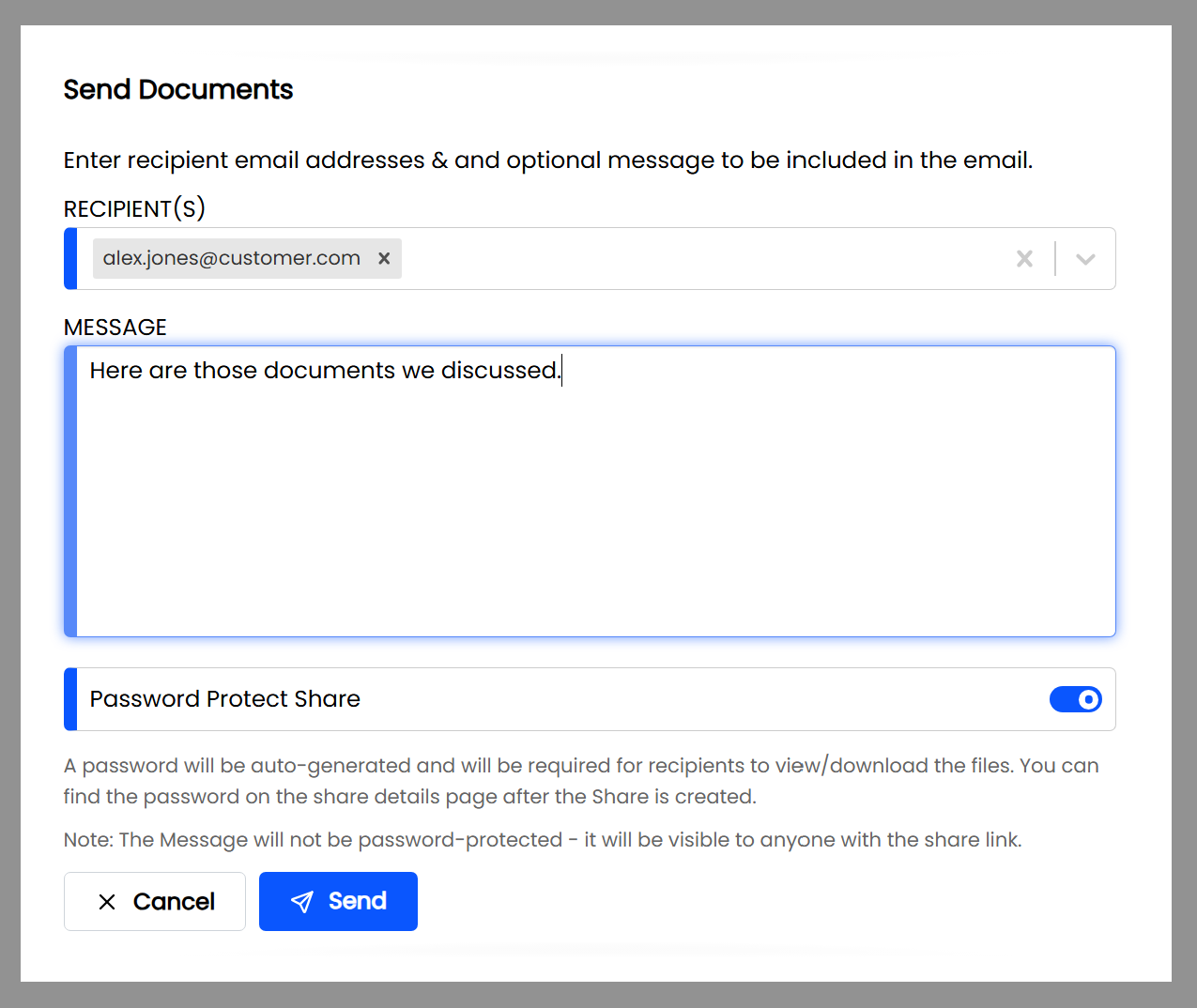
By popular request, you can now add a password to any share you send from LexWorkplace. When you turn it on, the public share page asks the recipient for the password before they can download anything — so a forwarded or misdirected link doesn't hand your files to the wrong person.
When you create a share, users can now choose to password-protect it and set a password, then give that password to your recipient separately (a phone call or a second email is the safe way to do it). When they open the share link, they'll see a prompt and can only reach the download after entering the correct password.
Note
The password protects the share page, not the downloaded
.zipfile itself. Your recipient enters the password to reach the download; the.zipthey download afterward is a standard, unencrypted file.
Require Password Protection Firm-Wide
Firm Admins can set password protection for the whole firm from Settings > Users & Security, using a simple drop-down with two modes:
Optional — each person decides whether to password-protect a given share (the default behavior).
Mandatory — every share is automatically password-protected, and users can't turn it off.
Mandatory mode is an easy way to keep client files consistently protected without relying on each person to remember.
Note: Only Firm Admins can change this setting.
Related
Rename and Delete Matter AI Chats
Your Matter AI conversations are easier to keep tidy. From the chat list in the sidebar, you can now rename a conversation to something you'll recognize later, or delete ones you no longer need.
Word and Launcher Fixes for Long File Names
We fixed a pair of issues that could stop Save as New Version from working in Microsoft Word.
When you opened a document with a long file name, Word would sometimes open it under a shortened "8.3" alias behind the scenes. LexWorkplace then didn't recognize the file and reported that it "hasn't been saved to LexWorkplace" — which meant Save as New Version wouldn't go through. That's now resolved: documents with long file names open and save back correctly. (This affected Word documents specifically; Excel and PowerPoint were not impacted.)
We also added a Reset Office / Launcher Link button under User Options in the Launcher. If you ever clicked Cancel and Remember my choice on the prompt Word shows when it asks to open the Launcher, that choice previously stuck — and Save as New Version wouldn't work again. This new button clears that choice so the prompt reappears the next time.
Note: The Reset Office / Launcher Link option is available on Windows.