New in LexWorkplace
July 30, 2026
In This Release
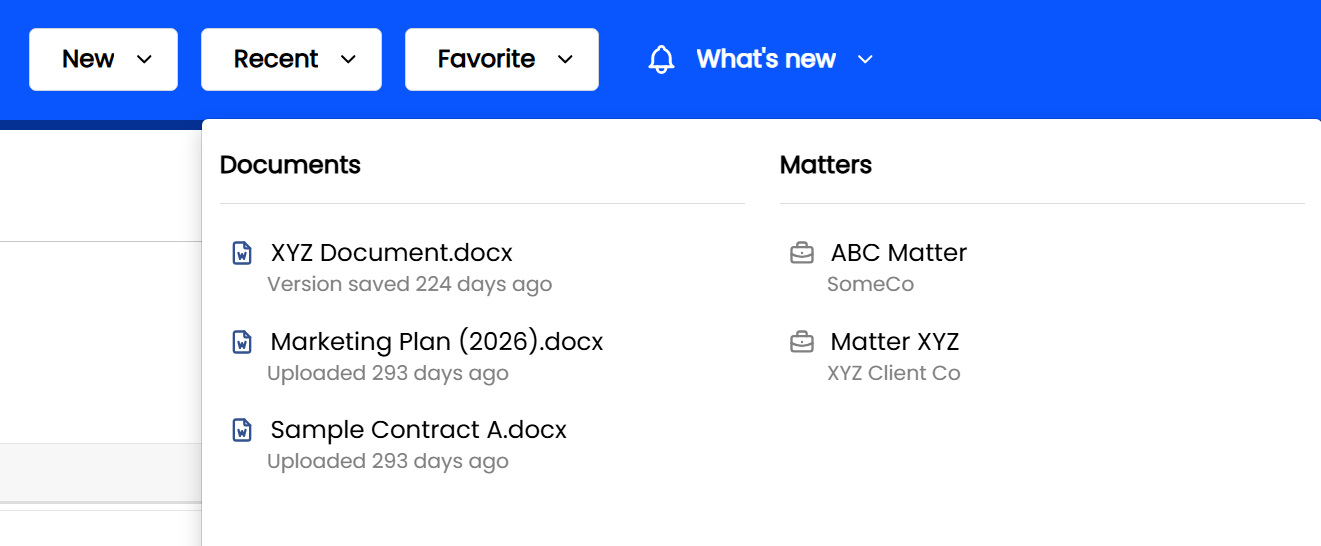
Clients now shown in the Recent Matters menu — quickly tell Matters apart at a glance
Smarter email uploads — LexWorkplace (web interface) now detects duplicate emails and lets you choose what to upload
Two bug fixes — Trash Bin Activity tab and New > Document
Recent Matters Now Show the Client
The Recent menu in the top navigation (Recent > Matters) now displays the client name beneath each Matter, in small gray text.
If you work across several Matters that share similar names, this update makes it much easier to spot the one you're looking for without opening it first.
Duplicate Detection When Uploading Emails
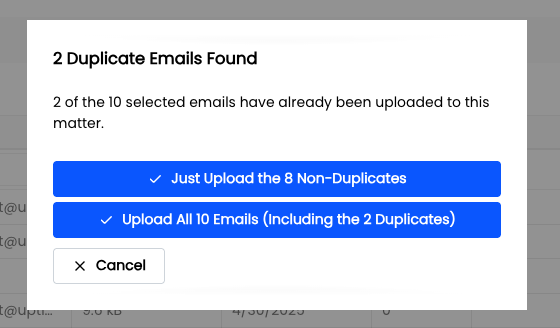
When you upload emails to a Matter's Email tab via the web app, LexWorkplace now checks whether any of the selected emails have already been uploaded to that Matter.
(This was always how email de-duplication worked via the Outlook add-in, and now via the web interface.)
If duplicates are found when you’re uploading Emails to the Email tab of a Matter, you'll be prompted with a choice:
Just Upload the Non-Duplicates — skip the emails already on file, or
Upload All Emails — including the duplicates.
This helps keep your Matter's email records clean and avoids accidentally uploading the same message twice.
Bug Fixes
Fixed an issue where the Trash Bin's Activity tab was not visible in certain cases.
Fixed an issue where creating a new document from New > Document in the top navigation caused an error in certain cases.