Applies To
LexWorkplace Starter, Core, Advanced
AI in LexWorkplace: How Your Data is Handled
Note: This article explains how AI works behind the scenes in LexWorkplace: which provider we use, what data is sent, what's stored, and who can use it. If you're looking for how to use the AI features, see: Document AI | Matter AI | LexWorkplace (system-wide) AI
Overview
LexWorkplace includes AI at three levels: a single document, a single matter, and your entire firm. Firms reasonably want to know what happens to their data when they use AI, and their clients often ask the same question.
In LexWorkplace, AI only runs when someone in your firm asks it a question. Simply creating, uploading, editing or saving a document never sends it to an AI provider. Your content is never used to train AI models.
This page is designed to answer the questions we hear most often. It's suitable to share with your firm's IT consultant, security reviewer, or ethics partner.
LexWorkplace AI at a Glance
Topic | Answer |
|---|---|
AI provider | OpenAI, via the OpenAI API. This is not the consumer ChatGPT product. |
Current model | GPT 5.6-luna |
Is our content used to train AI models? | No. OpenAI does not use API content to train its models. |
When is data sent to AI? | Only when a user actively uses an AI feature. Nothing is sent when files are uploaded. |
What is sent? | Only the text needed to answer the question, along with the question itself. |
What LexWorkplace keeps | Document AI: nothing. Matter AI and LexWorkplace AI: conversation history, until the user deletes it. |
What OpenAI keeps | Request and response data for up to 30 days, for abuse monitoring only, then it's deleted. |
Who can use AI? | Users can only use AI on content they already have permission to access. |
Can AI be turned off? | Not currently. |
How Your Data Flows
Here's what happens from upload to answer:
Upload. When a file is added to LexWorkplace, it's indexed for full-text search. No AI is involved, and nothing is sent to an AI provider.
Ask. A user opens Document AI, Matter AI, or LexWorkplace AI and asks a question.
Retrieve. LexWorkplace finds the relevant text in your search index.
Process. That text and the user's question are sent securely to the OpenAI API.
Respond. The answer is returned to the user. Depending on the feature, the conversation is either discarded or saved to the user's history.
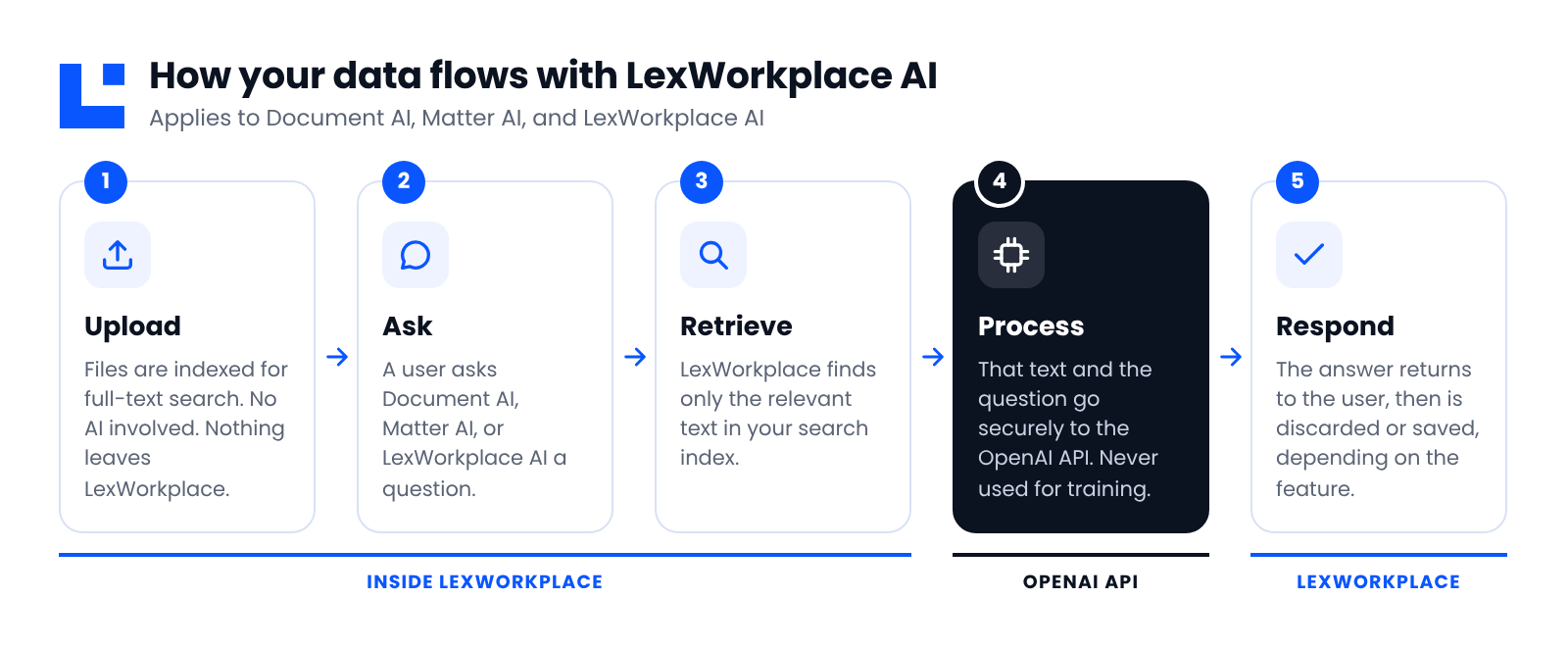
Your documents stay in LexWorkplace. Only the text needed to answer a question is sent for processing, and only when a user asks.
Note: LexWorkplace uses a technique often called retrieval-augmented generation (RAG). Rather than handing an AI model your whole document library, LexWorkplace first searches for the passages relevant to your question, then asks the AI to answer using only those passages.
Frequently Asked Questions
How It Works
Is anything sent to AI when I upload a document? No. Uploading only indexes the document for search within LexWorkplace. Content is sent to the AI provider only when a user actively asks an AI feature a question.
Is the search index the same thing the AI uses? Yes. When a file is uploaded, it's indexed for full-text search, and that same index powers AI. Document AI reads a document's text from the index, and Matter AI and LexWorkplace AI search it to find relevant content. There's no separate AI-specific index or copy of your data.
Provider and Training
Which AI provider and model does LexWorkplace use? LexWorkplace uses OpenAI's models through the OpenAI API. The specific model in use currently is outlined above; we may update the model as better options become available, and we'll keep this page current when we do.
Is this ChatGPT? No. LexWorkplace uses the OpenAI API, which is OpenAI's business platform. It's governed by different data-use terms than the consumer ChatGPT app.
Is our content used to train AI models? No. Under OpenAI's API data-usage policy, content sent through the API is not used to train OpenAI's models. That's a key difference from consumer ChatGPT, which may use conversations for training by default.
Access and Control
Can AI see matters or documents I don't have access to? No. LexWorkplace AI respects Matter Permissions, so only users with access to a matter can use Matter AI on it.
Can we turn AI off for our account or for specific matters or users? Not currently. There's no account-level, matter-level or user-level switch to disable AI features. Access to AI is controlled by your existing permissions: if a user can't open a matter, they can't use AI on it.
Can other users see my AI conversations? No. All AI conversations are private to the user who created them, unless the creating user manually saves the chat conversation as a Matter Note or to a new email.
Retention and Deletion
How long are AI conversations kept, and where?
Feature | Where | How long |
|---|---|---|
Document AI | Not stored | Discarded when the session ends |
Matter AI | LexWorkplace's database | Until the user deletes it |
LexWorkplace AI | LexWorkplace's database | Until the user deletes it |
At OpenAI (all features) | OpenAI's systems | Up to 30 days, for abuse monitoring only |
Can users delete their AI conversations? Yes. Users can delete their own Matter AI and LexWorkplace AI conversations at any time from their conversation history.
Warning
Deleting an AI conversation is permanent. If you want to keep an AI answer, save it as a Matter Note first.
What does OpenAI keep? Per OpenAI's standard API retention policy, OpenAI may retain request and response data for up to 30 days to monitor for abuse. After 30 days it's deleted, unless OpenAI is legally required to keep it. This data is not used for training.
Using AI Responsibly
Should we review AI output? Always. AI models can misread context or produce answers that sound confident but are incomplete or wrong. Treat AI output as a capable first draft, and verify anything important against the source documents.
How should we describe this to our own clients? That's your firm's call, but this page is written so you can share it directly. If your clients or engagement letters require specific disclosures about AI use, we're happy to answer any additional questions.
Subprocessors
Subprocessor | Purpose | Data involved | Policy |
|---|---|---|---|
OpenAI | Powers Document AI, Matter AI, and LexWorkplace AI | Text relevant to a user's question, the question itself, and the AI's response |
More Questions
If your firm or a stakeholder has a question that this page doesn’t answer, please contact our Support Team.