New in LexWorkplace
July 09, 2026
In This Release
Manual Document Versioning (New, Firm-Wide Setting)
Manual Document Versioning
By default, LexWorkplace creates a new Document Version every time you save a document — this is called Automatic Versioning. Some firms, particularly those migrating from other DMS products, prefer to only create a new version when they explicitly ask for one. For these firms, LexWorkplace now offers Manual Versioning, a firm-wide setting that changes how — and when — new Document Versions are created.
How Manual Versioning Works
When Manual Versioning is selected for the firm, LexWorkplace only creates a new Version when a user directs it to, within Word/Excel or within LexWorkplace itself.
In this mode, LexWorkplace will still keep every Save; each individual save will appear under its corresponding Version.
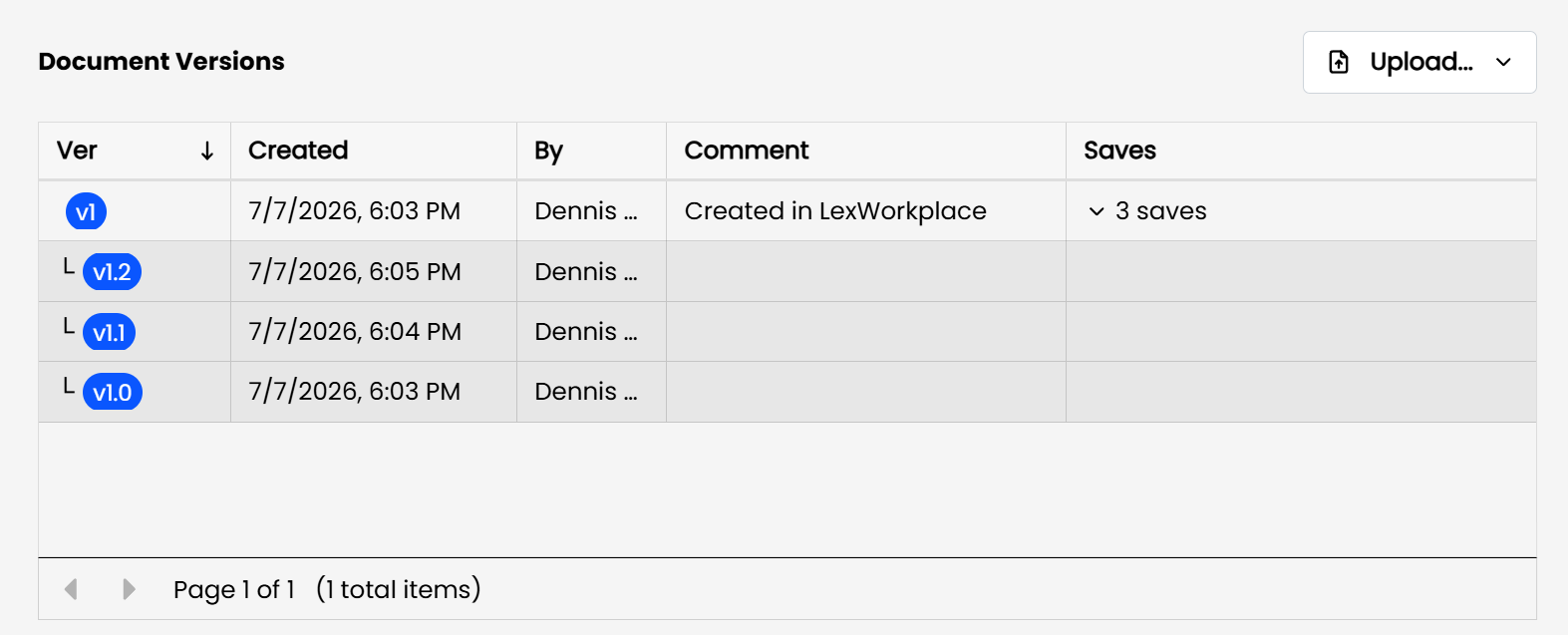
Under Manual Versioning, each Document Version has two numbers, separated by a decimal: the Version number and the Save number. For example, a document at 2.5 is on Version 2, Save 5.
Here's how it plays out as you work on a document:
You upload or create a new document. It becomes Version 1.0.
You open it, make edits, and save. It becomes 1.1.
You save again. It becomes 1.2, then 1.3, and so on with each save.
When you're ready to formally create a new version, click Save as New Version (see below). The document becomes Version 2.0, and the save counter resets.
Learn More
For full details on how Manual Versioning works, including viewing individual saves, switching between Automatic and Manual, and deleting versions/saves, see: