Applies To
LexWorkplace Starter, Core, Advanced
Overview
My Firm brings everything about your firm into one place: your firm's name, locations, practice areas, and Firm Documents, plus the background and instructions that help LexWorkplace AI understand how your firm works.
Most of what you set here makes LexWorkplace AI smarter. When LexWorkplace AI knows your practice areas, what kind of firm you are, and how you like things done, every user gets better answers without having to explain the firm's background in every conversation.
How to Access My Firm
Click My Firm in the left navigation (just below LexWorkplace AI).
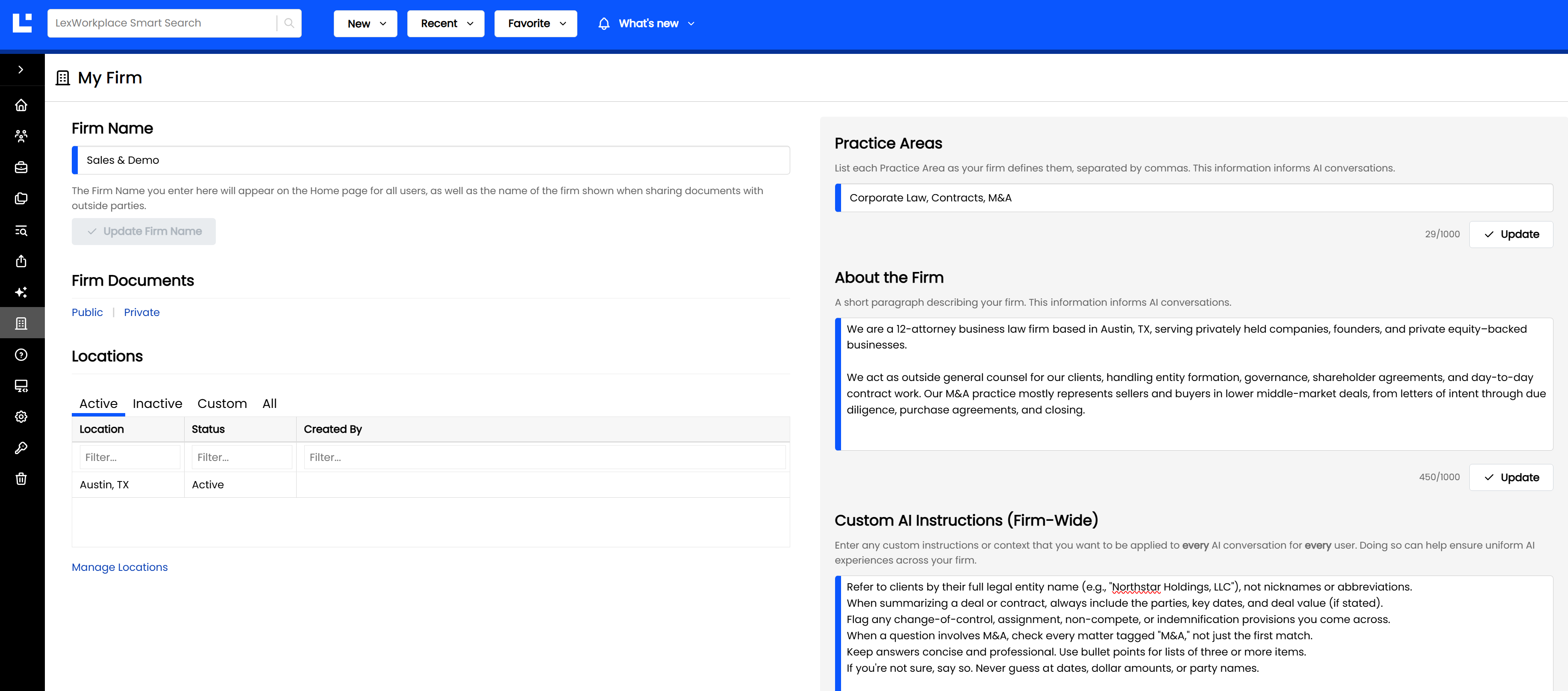
What’s on the My Firm Page
Section | What it Does | Who Can Edit |
|---|---|---|
Firm Name | Your firm's display name, used on the Home page, in share emails, and elsewhere in LexWorkplace | Firm Admins (read-only for everyone else) |
Firm Documents | Quick links to your Firm Documents (Public and Private) | — |
Locations | A read-only list of your firm's offices. Click Manage Locations to make changes. | Firm Admins, via Manage Locations |
Practice Areas | Your firm's practice areas, separated by commas. Helps LexWorkplace AI understand your work. | Users with the Manage Firm-wide Custom AI Instructions right |
About the Firm | A short description of your firm. Gives LexWorkplace AI useful background. | Users with the Manage Firm-wide Custom AI Instructions right |
Custom AI Instructions | Instructions applied to every AI conversation, for every user in the firm | Users with the Manage Firm-wide Custom AI Instructions right |
A Note on Locations
"Office/Branch" has been renamed to Location throughout LexWorkplace.
Helping LexWorkplace AI Understand Your Firm
The last three sections of My Firm (Practice Areas, About the Firm, and Custom AI Instructions) are added automatically to every LexWorkplace AI conversation for every user in your firm. A few minutes spent here pays off in every conversation after that.
Practice Areas
List your firm's practice areas, separated by commas. For example:
Corporate Law, Contracts, M&A
About the Firm
Describe your firm in a few sentences: its size, where you practice, who your clients are, and how you organize your work. For example:
We are a 12-attorney business law firm based in Minneapolis, serving privately held companies, founders, and private equity–backed businesses across the Upper Midwest. Our work centers on corporate law, commercial contracts, and mergers & acquisitions. Matters are typically organized by client, with separate matters for each transaction or major contract. Deal matters are tagged "M&A."
Tip
Explain how your firm uses tags, Matter types, or naming conventions. It helps LexWorkplace AI know where to look.
Custom AI Instructions
These are firm-wide rules and conventions that LexWorkplace AI should follow in every conversation, for every user. For example:
"Refer to clients by their full legal entity name."
"When summarizing a deal or contract, always include the parties, key dates, and deal value (if stated)."
"Flag any change-of-control, assignment, non-compete, or indemnification provisions."
"Use Canadian spelling in all responses."
Note: Each user can also add their own personal instructions (their role, preferred tone, and format) on the My Profile page. Firm-wide rules belong here on My Firm; personal preferences belong on My Profile. See the full LexWorkplace AI article for details.
Access + Permissions
Every user can view the My Firm page.
Firm Name and Locations can be changed only by Firm Admins.
Practice Areas, About the Firm, and Custom AI Instructions can be changed only by members of a group with the Manage Firm-wide Custom AI Instructions right, found under the AI section in Groups + Rights Management.